
EZ Package Disabler (Samsung)2.5.5 - Google Play
You'll be able to see results in few seconds.
Publisher Description
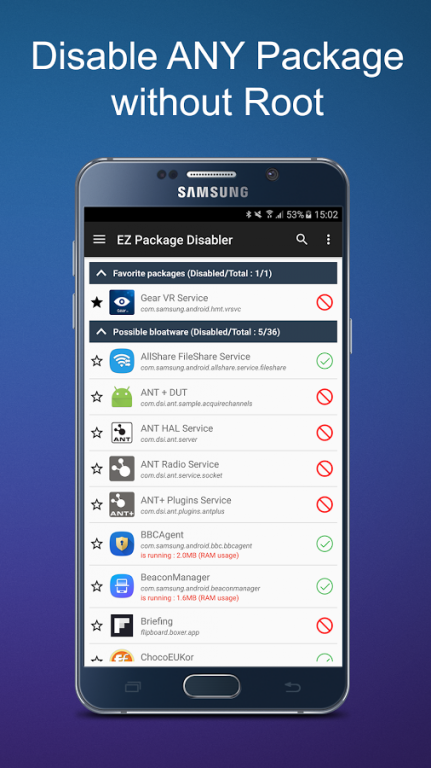
**ONLY AVAILABLE FOR SAMSUNG DEVICES - NO ROOT REQUIRED**
7-DAY REFUND GUARANTEED WITH 100% MONEY BACK.
EZ Disabler is the best and safest app to disable any packages on your Samsung with no root required. It means all the unwanted applications that come pre-installed on your phone can now be marked unavailable from running and updating.
Usages :
- Disable pre-installed bloatware
- Improve battery life and phone performance
- View cardboard apps on Gear VR headset *
- Disable tracking app to keep your personal or corporate info stay secure
- Hide apps
- And many others...
* To view cardboard app on Gear VR headset, disable the package “Gear VR Service”. Re-enable it when you want to use the default Gear VR app again.
Why choose EZ Disabler :
- We have excellent track record of working on Android with 10 millions of users worldwide. Our apps have been featured on Google Play Homepage and many popular tech sites.
- EZ Disabler is the ONLY app that provides descriptions for every pre-installed packages, so you can quickly decide whether or not to disable a suspect application.
- EZ Disabler is the most feature-rich and most up-to-date package disabler app that is nice and easy-to-use.
Main features :
- Disable/enable any package
- Show descriptions of system packages
- Warn before a critical package is disabled
- See how packages are consuming RAM in background
- Highly customised widgets
- Automate disabling/enabling tasks
- Support Tasker/Locale/MacroDroid
Other useful features :
- Show lists of only disabled/enabled or running packages
- Searching, grouping and pinning favourite packages to top
- Save/load package lists to/from xml files
- Setup app lock to prevent unauthorised access
- Uninstall, clear data, stop and launch any packages
- And many others...
**IMPORTANT NOTES**
- Please enable all packages, even apps that you consider bloatware before a system update.
- The easy way to uninstall this debloat software is to open the app, tap on the hamburger button at the top left corner and tap on “Uninstall this app”.
- If you still have problems with uninstalling, try deactivate admin access of this package disabler by going to “SETTINGS” -> “SECURITY” -> DEVICE ADMINISTRATOR -> Disable admin access for “EZ Disabler”.
**DISCLAIMER**
EZ Disabler is a powerful app that lets you modify the critical part of Android system. Therefore, you should be careful before disabling any package as it might lead to device malfunction. You should backup your data and only disable packages which are sure will not cause any trouble to the system. Although we did our best effort to help you minimise the risk, we hold no responsibility for any damage you may cause.
If you have any questions, feedback or you can help to translate this package disabler app into your language, please send an email to "ez.package.disabler@gmail.com”.
To request a refund, simply send your order number to the same email above.
For business enquiry regarding this package disabler app, please visit our website http://hecorat.com for more information.
About EZ Package Disabler (Samsung)
The company that develops EZ Package Disabler (Samsung) is Hecorat. The latest version released by its developer is 2.5.5.
To install EZ Package Disabler (Samsung) on your Android device, just click the green Continue To App button above to start the installation process. The app is listed on our website since 2016-11-14 and was downloaded 0 times. We have already checked if the download link is safe, however for your own protection we recommend that you scan the downloaded app with your antivirus. Your antivirus may detect the EZ Package Disabler (Samsung) as malware if the download link to com.hecorat.packagedisabler is broken.
How to install EZ Package Disabler (Samsung) on your Android device:
- Click on the Continue To App button on our website. This will redirect you to Google Play.
- Once the EZ Package Disabler (Samsung) is shown in the Google Play listing of your Android device, you can start its download and installation. Tap on the Install button located below the search bar and to the right of the app icon.
- A pop-up window with the permissions required by EZ Package Disabler (Samsung) will be shown. Click on Accept to continue the process.
- EZ Package Disabler (Samsung) will be downloaded onto your device, displaying a progress. Once the download completes, the installation will start and you'll get a notification after the installation is finished.
Program Details
System requirements
Download information
Pricing
Version History
version 2.5.5
posted on 2016-11-14
If you have any problems/suggestions or want refund, please send an email to ez.package.disabler@gmail.com for support.,If you like this app, please encourage us by rating it 5 stars ★★★★★ :-)
version 2.5.5
posted on 2016-11-14
Disclaimer
Official Google Play Link
We do not host EZ Package Disabler (Samsung) on our servers. We did not scan it for viruses, adware, spyware or other type of malware. This app is hosted by Google and passed their terms and conditions to be listed there. We recommend caution when installing it.
The Google Play link for EZ Package Disabler (Samsung) is provided to you by apps112.com without any warranties, representations or guarantees of any kind, so access it at your own risk.
If you have questions regarding this particular app contact the publisher directly. For questions about the functionalities of apps112.com contact us.
